Monday, December 19, 2011

Side-by-Side Viewing of Mobile Devices

One of the things we've found in our work with testing various mobile devices is that it is often very convenient to be able to see the same page delivered to two different devices in a side-by-side comparison. The visual impact of the changes can be enlightening.

It turns out that this is relatively simple to do, using a special launch page and custom playback script. In the script the UserAgentString is set to a device and a sub-window opens emulating that device. After the two [it could be more, if you have the need] sub-windows are opened eValid pauses playback, leaving both sub-windows open and live.

In this state, you can manipulate either of the two emulated devices in any way you wish, and see what the server renders in response. For backup, you can see the server response for the same page request in the parent screen. Here is a screenshot of Two Smartphones (iPhone and Samsung Galaxy) and of Two Tablets (iPad and Samsung Galaxy Tab). Both screenshots show the same page all three ways. And you can see the UserAgentStrings directly.

Here is the full writeup of how this is done, including a sample script and a typical parameter setting file: Side-by-Side Comparison of Two Devices. Sample screen images are shown in Side-by-Side Sample Screens.

Wednesday, December 14, 2011

Selected User Forum Posts

Beginning in mid-2010 we have directed all technical support questions to the eValid User Forum. We have learned that when one user has an issue, all users can profit from the answer.

Here is an additional selection of some of the posts that we think would be of general interest.

Thursday, December 8, 2011

Mobile Device Testing

There has been a lot of interest recently in how to handle quality issues (content, performance, server capacity) for web applications that run on mobile devices. From the eValid perspective the main issues work out to these:

  • Device Simulation: Using the eValid SetUserAgent command to set the User Agent String (UAS) so that the subsequent browser activity is reported to the server as if it was being requested from the specified device. eValid does this without needing the actual hardware and software! The server responses to client-side user requests made in this way behave as if it was talking to the mobile device.

  • Content Validation: Once a script is running, you need to validate that the eValid rendered output matches what you expect in the actual device. Here is a Rendering Comparison for Common Devices Vs. Device Emulator. As you can see, other than the screen size, the rendering by eValid is identical to that for the mobile device. This confirms that evalid is rendering your mobile application correctly.

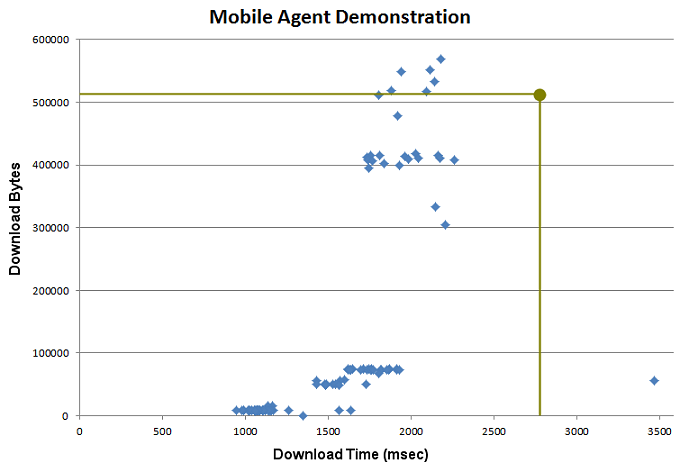
  • Functional Testing: To illustrate how this works we ran an experiment that applied a simple test to 100 Mobile Devices, and recorded download sizes and times for each cases. A sample of that data is shown here, with some Selected Screenshots of how the server content varied as a function of the different devices and software versions simulated (with download byte counts for each device shown).

    The most interesting thing we saw was that the asymmetric ratio of Download Bytes vs. Download Time, which illustrates that some servers are not prepared to deliver mobile content to every kind of device.

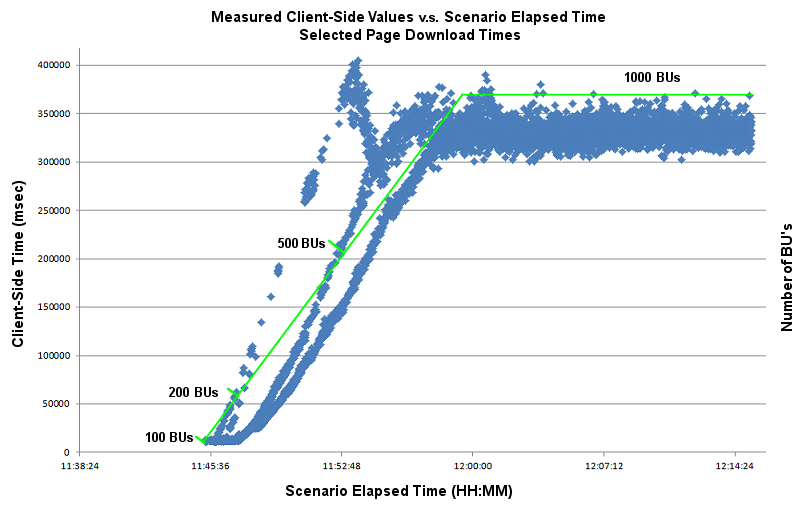
  • Server Loading: Functional tests lift easily to a server loading context, with multiple eValid instances (we call them Browser Users or BUs) working in parallel to create the load. This is illustrated in the experiment that we ran to drive a mobile application from a simulated smartphone up to 1,000 BUs -- up to 1,000 simulated users. The resulting
    Chart of Derived Internal Response Times shows that this particular server began to have a problem beyond ~200 simultaneous users.

The thing to remember is that eValid can effectively drive mobile devices that support web applications perfectly well, and can impose realistic load levels sufficient to identify bottlenecks.


Tuesday, November 22, 2011

Selected User Forum Posts

Beginning in mid-2010 we have directed all technical support questions to the eValid User Forum. We have learned that when one user has an issue, all users can profit from the answer.

Here is an additional selection of some of the posts that we think would be of general interest.
  1. The settings for sourceIndex and elementValue -- Rules about preserving internal variable values. 
  2. Why doesn't eValid support XPATH? -- eValid's internal XPATH capabilities explained.
  3. The value of sourceIndex -- Ways to retrieve the current value of internal parameters.
  4. Synchronize a playback on an invisible property value. -- Unusual ways of achieving synchronization.
  5. My website changes in the middle of the run -- What to look out for when web pages change rapidly. 
  6. The minimum "settling time" -- How much time is spend "rendering" and "settling" a page? 
  7. Text Synchronization -- Details of how to do synchronization on page text.
  8. How do I turn on Application mode or Desktop mode? -- Internal mode change hints.
  9. How well does eValid scale? -- Details on scaling eValid to high repetition counts.
  10. A Dynamic String -- Methods of manipulating a dynamic string.

Monday, November 21, 2011

Mobile Device Rendering Validation Experiment

We had had some people asking whether the eValid rendering of a mobile web application REALLY matches up with what you actually see in the real device?

To illustrate that it does, we constructed a demo of four four popular smartphone and how they rendered a page compared with the eValid renderingwhen eValid is imitating the same device.The Rendering Comparison for Common Devices results speak for themselves.

As you can see in a side-by-side comparison (click th images and move them so theyare side by side) the HTML that is delivered by the server to the suitably disguised eValid browser is renders identically to what you see in the smartphone.

Monday, November 7, 2011

Webinar: Load Testing Mobile Web Apps

Simulate 1,000's of Mobile Browser Users
Full AJAX Realism on All Mobile Devices
Quick Identification of Bottlenecks

Register
Wednesday, 16 November 2011
2:00 PM Eastern Time / 11:00 AM Pacific Time
QA/Testing/Tuning/Performance projects need to qualify performance of complex AJAX web applications -- within strict budget and time constraints -- to make sure their server-stack setups can meet the load.

The traditional methods of ramping up load, based on using HTTP/S simulations or "VUs", don't always work when asynchronous AJAX applications are involved. VU's don't do AJAX. You need a browser.

eValid server loading methods offer both quick-to-create, realistic, and fully synchronized AJAX functional tests. Plus you can lift those tests into performance/loading scenarios that can involve 100's or 1,000's or 10,000's of Browser Users ("BUs") per machine.

In this webinar you'll learn: how special eValid commands overcome problems with variable-time playback dependency; how to create full-reality AJAX tests quickly; how to adjust tests to be totally self-synchronizing under stressed AJAX conditions; how to incorporate tests in an eValid LoadTest scenario; how to launch 100's or 1,000's or 10,000's of Browser User (BU) instances; and, how to analyze consolidated performance summary data to identify server-stack bottlenecks.

This unique approach demonstrates how eValid becomes a genuine force multiplier in your web application performance testing efforts.


Webinar
Topic
Summary
  • eValid Architecture and Structure: How eValid functional and performance testing works.
  • Functional Testing: How to make reliable recordings of AJAX applications.
  • Making AJAX Tests "LoadTest Safe": How to augment tests for complete AJAX synchronization.
  • Creating LoadTest Scenarios: How to use the LoadTest scenario editor to organize realistic LoadTest control scripts.
  • Running LoadTests: How to launch single and multiple-instance runs using "cloud computing" resources.
  • Finding Bottlenecks: How to read the LoadTest and other raw data to help spot server-stack issues.

You are cordially invited to attend this free Webinar.

Register now

Thursday, November 3, 2011

Mobile Device Loading Experiment

Using eValid's ability to mimic being a mobile device, we engineered a simple demonstration of a 1,000 browser user (1,000 BU) test of a public transportation system's schedule information page, which is intended to be delivered to users of mobile devices. You're in the station and you want to know when the next train for your destination is? But you don't want it to take too long to show you the results, or you might miss your connection.

We set eValid up to imitate an iPhone, and configured the LoadTest scenario to launch successive eValid instances at 1 second intervals. The test script takes about 15 seconds to navigate to the website and download the key schedule data page. We put the playback in "repeat mode" so that, after all 1,000 BUs were launched there would be the equivalent of 1,000 users driving the mobile device.

Finally, the single data point taken from each and every repetition — some 5,587 data points in total — was the time that the actual data page took to download. Here's the chart of the results as a function ot time within the scenario:

Chart of Derived Internal Response Times (Click to See Full Image)

The payoff information here can be seen at the beginning of the chart, when the download time was pretty much independent of the applied load -- up to about 200 BUs. After that, the more users requesting that page, the longer it took, so that at the end, with 1,000 BUs asking the download time was as long as 5 minutes. It looks like someone'll be missing the bus!

Here is the link to the full solution description: Mobile Device Loading Experiment – 1,000 BUs