Here are some recent selected forum posts from our eValid forum:
Need help with filling out two blank fields on a webpage! -- Simple enough to do, explained here.
Showing posts with label Mobile. Show all posts
Showing posts with label Mobile. Show all posts
Tuesday, April 18, 2023


Friday, October 14, 2022
Selected Recent Forum Posts
Here are some recent selected forum posts from our eValid forum:
How to consolidate all my loadtest results -- Step-by-step process to aggregate data.Using the eValid select image or select text commands -- Validating the right text fragment is often critical!
Friday, May 13, 2022
Selected Recent Forum Posts
Here are some recent selected forum posts from our eValid forum:
Help with an input field for XPath -- The key is to use the PageMap feature for find the right sourceIndex value.The meaning on the eValid return codes during batch mode -- All the facts about the system interface!
Monday, January 17, 2022
Selected Recent Forum Posts
Here are some recent selected forum posts from our eValid forum:
How does eValid handle website with Secure Session IDs -- Explanation of "secure zone" switches.
Record saving an image of a website answer -- Test passes if the screens match.Wednesday, November 24, 2021
Selected Recent Forum Posts
Here are some recent selected forum posts from our eValid forum:
Case studies of eValid used for Medical device monitoring -- A good example of eValid doing regular monitoringAll the command line switches that deal with batch scripts -- Effectively running eValid "in the background"
Monday, July 26, 2021
Selected Recent Forum Posts
Here are some recent selected forum posts from our eValid forum:
Does eValid respect the Same Origin Policy? -- An old but critically important security issue.
Inserting a new recording into existing scripts -- Scripts can "call" other scripts!
Thursday, July 8, 2021
Selected Recent Forum Posts
Here are some recent selected forum posts from our eValid forum:
Using eValid to look for regular expressions -- The syntax may be tricky, but the powerful results are worth it.Remembering individual user settings in eValid -- Every user can have their own profile to match individual needs.
Monday, June 21, 2021
Selected Recent Forum Posts
Here are some recent selected forum posts from our eValid forum:
General questions about the eValid PageMap feature -- Looking inside the DOM for important testing clues.Some details on eValid logfiles -- How eValid sends results to the "outside world" i.e. to Windows.
Wednesday, June 9, 2021
Selected Recent Forum Posts
Here are some recent selected forum posts from our eValid forum:
Using eValid to record screen applications -- This enables eValid to handle both web and desktop testing in one system.
The main features on the eValid Site Mapping -- A summary of eValid spidering capabilities
The main features on the eValid Site Mapping -- A summary of eValid spidering capabilities
Friday, April 9, 2021
Selected Recent Forum Posts
Here are some recent selected forum posts from our eValid forum:
Running an eValid test in parallel -- The implications of "desktop safe" are explored.Info on changing the Navigation output of a recording -- Fine-detail manipulation of a script for special effects.
Tuesday, February 9, 2021
Selected Recent Forum Posts
Here are some recent selected forum posts from our eValid forum:
Details on eValid interfacing with SQL -- The interface you need is already there!
Using the value substitution feature in eValid -- How to pass parameters back and forth in eValid.
How eValid can keep up with all of the AJAX activity? -- Extra thoughts on synchronizing AJAX web apps.
Wednesday, April 10, 2019
Selected Recent Forum Posts
Here are some recent selected forum posts from our eValid forum:
Details on how eValid keeps track of frames in a webpage -- Some web pages have multiple frames, and here is how you distinguish them.
Need help with modifying playback switches for my tests -- Keeping track of multiple parameters can be tricky, but eValid provides an easy mechanism.
How does eValid work with jQuery Mobile applications -- A fully worked example illustration jQuery interactions.
Wednesday, June 20, 2018
Selected Recent Forum Posts
Here are some recent selected forum posts from our eValid forum:
Perform an event during an eValid playback test -- A deep dive into DOM event triggering.
Perform an event during an eValid playback test -- A deep dive into DOM event triggering.
Tuesday, November 21, 2017
Selected Recent Forum Posts
Here are some recent selected forum posts from our eValid forum:
Same Origin Policy question -- eValid, as a web application driver, handles same-origin policy issues safely.
Tuesday, July 11, 2017
Selected Recent Forum Posts
Here are some recent selected forum posts from our eValid forum:
Can eValid visit URL pages not visible -- What you get is not necessarily what you see, nor would you want it to be!
Server Loading for a mobile website -- Yes, eValid can pretend to be ANY browser on ANY device, so you can do a LOT of loading work from a single test engine.
Use eValid to improve my download speeds -- Maybe eValid can even help you fix performance issues?
Can eValid visit URL pages not visible -- What you get is not necessarily what you see, nor would you want it to be!
Server Loading for a mobile website -- Yes, eValid can pretend to be ANY browser on ANY device, so you can do a LOT of loading work from a single test engine.
Wednesday, February 22, 2017
Selected Recent Forum Posts
Here are some recent selected forum posts from our eValid forum:
A few questions regarding AJAX -- More discussion about synchronization of AJAX applications
Seeking examples of what eValid emulates different-devices -- Some "how-to's" on using eValid for testing mobile applications.
Need help with a test items past the first one -- Here's a solution to a complex test concern.
A few questions regarding AJAX -- More discussion about synchronization of AJAX applications
Seeking examples of what eValid emulates different-devices -- Some "how-to's" on using eValid for testing mobile applications.
Need help with a test items past the first one -- Here's a solution to a complex test concern.
Friday, May 27, 2016
Selected Recent Forum Posts
Here are some recent selected forum posts from our eValid forum:
Can evalid be used to extract performance timings? -- The main KPIs you need are built into eValid to make monitoring easy.
Does eValid test mobile apps? -- Here is the story on having eValid imiate other browsers besides the native IE equivalent.
Need help with a RESET button thats on a form page! -- The eValid structural web page testing commands make handling a RESET button easy.
Will eValid work on IE11 Windows 10? -- The lastest version of eValid runs fine on the latest versions of Windows and IE.
Can evalid be used to extract performance timings? -- The main KPIs you need are built into eValid to make monitoring easy.
Does eValid test mobile apps? -- Here is the story on having eValid imiate other browsers besides the native IE equivalent.
Need help with a RESET button thats on a form page! -- The eValid structural web page testing commands make handling a RESET button easy.
Will eValid work on IE11 Windows 10? -- The lastest version of eValid runs fine on the latest versions of Windows and IE.
Friday, January 9, 2015
eValid Supports Mobile Via Device Imitation
We know that many of our customers use eValid in "monitoring mode" which
means, roughly, that they use eValid playbacks to collect detailed data
about the behavior of their application (performance, validity, reliability, etc.).
In most cases these test are run from from one or
more geographic locations -- to show (and validate) performance from various locations worldwide.
We know that some of our "monitoring mode" users run multiple millions of tests per month, and that they run tests on some of the very most sophisticated business process software systems. You can get eValid to imitate any mobile device. There are many, many such.
Here is the simple batch command that does it:
You can also see Starting eValid With A Specific User Agent String (UAS) and Illustration of User Agent String Modification.
Feel free to contact us for more details, worked examples, comparative performance checks, etc.
We know that some of our "monitoring mode" users run multiple millions of tests per month, and that they run tests on some of the very most sophisticated business process software systems. You can get eValid to imitate any mobile device. There are many, many such.
Here is the simple batch command that does it:
start evalid -AGENT "Mozilla/5.0As the number of devices grows, this especially affects our monitoring customers. But they're covered because they can monitor ANY device easily, and probably with existing test scripts.
(iPhone; U; CPU like Mac OS X; en)
AppleWebKit/420+ (KHTML, like Gecko) Version/3.0
Mobile/1A543a Safari/419.3"
exit
You can also see Starting eValid With A Specific User Agent String (UAS) and Illustration of User Agent String Modification.
Feel free to contact us for more details, worked examples, comparative performance checks, etc.
Friday, August 1, 2014
Scaling Issues in Mobile Testing
The number of different mobile devices keeps growing.
According to a Ryan Lawler post, some
7,000 Different Types Of Mobile Devices Access Facebook Every Day
.
Daily.
And this was in 2012.
The total number of combinations that may need to be tested
is surely growing.
Two factors are involved: the number of different browser versions (currently > 500) and the number of different device development environment versions (currently > 100).
You have to multiply these two factors to get the total "perfect" test count.
Two factors are involved:
the number of different browser versions (currently > 500)
and the
number of different device development environment versions (currently > 100).
You have to multiply these two factors to get the total "perfect" test count.
Hence, scale is clearly important if you are working on testing mobile web applications.
With that many device-browser combinations it becomes
quite difficult to obtain actual instances of all of these devices.
While some service solutions we've seen
offer direct device tests of several hundred combinations,
using actual devices that are controlled remotely,
device-browser combinations in the 1,000's or 10,000's just aren't feasible economically.
eValid can overcome a major part of that difficulty with its ability to imitate other any browser. eValid can do this when launched from a command line option, or it can do this in individual subwindows launched inside a playback script using the SetUserAgent Command. The result is a quick -- and highly scalable -- method to test a web application
in a variety of browsers.
The behavior variations between browsers can be quite remarkable, as this Mobile Agent Demonstration Experiment shows. For these 20 different mobile device browsers it's important to note how the pages vary, and how big the variations are in the downloaded file size.
For good measure, here are
Selected Screenshots for 200+ Mobile Devices.
Using eValid's device imitation feature it's possible to run full-realism, dynamic tests on 1,000's of browser variations by just putting the playback process in a loop, each repetition trying a different setting. Web application validation — an otherwise very difficult task to to with 100% thoroughness — becomes much easier because you can use a single test appliance with great scaling leverage.


Two factors are involved: the number of different browser versions (currently > 500) and the number of different
Hence, scale is clearly important if you are working on
eValid can overcome a major part of that difficulty with its ability to imitate other any browser. eValid can do this when launched from a command line option, or it can do this in individual subwindows launched inside a playback script using the SetUserAgent Command. The result is a quick -- and highly scalable -- method to test a web
The behavior variations between browsers can be quite remarkable, as this Mobile Agent Demonstration Experiment shows. For these 20 different mobile device browsers it's important to note how the pages vary, and how big the variations are in the
Using eValid's device imitation feature it's possible to run full-realism, dynamic tests on 1,000's of browser variations by just putting the playback process in a loop, each repetition trying a different setting. Web application validation — an otherwise very difficult task to to with 100% thoroughness — becomes much easier because you can use a single test appliance with great scaling leverage.
Tuesday, July 29, 2014
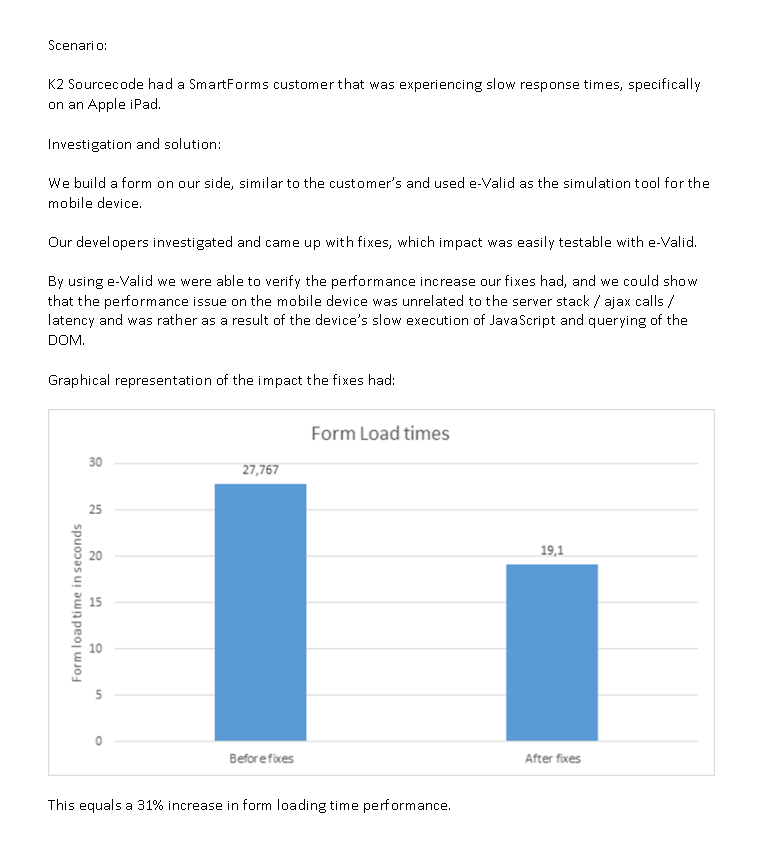
Customer Finds Mobile Performance Flaw
We heard from an eValid user about a novel use of the internal timing capability
to track down and fix a problem that only appeared when the application was
viewed with evalid imitating a mobile device.
Theirtesting process involved setting up timing measurements within the DOM using the
structural commands.
The timing data let them to identify the fixes that were needed, and the same
test setup was used to verify the performance improvement that was evident
on the mobile device .
Here is the writeup they provided describing these results:

Click image for full size version
Their
Here is the writeup they provided describing these results:
Click image for full size version
Subscribe to:
Posts (Atom)